








Predictive Market OpenClaw Practical Manual Part Two: From Configuration to Trading Practice
Mar 19, 2026 15:21:59


Author: Changan I Biteye Content Team
When was the last time you stared at the market until what time?
The longest I ever did was from the opening of the US stock market until the close of Asia, during which I slept for two hours and woke up to find I had missed a perfect entry point.
I started to ponder: why does this task have to be done by a person?
After OpenClaw integrated with Hyperliquid and Polymarket, I tested the answer to this question. Some things went smoother than expected, while some pitfalls were deeper than anticipated. This article covers everything.
Having been caught in the rain before, Biteye also wants to hold an umbrella for you.
1. Installation Steps
If you want AI to trade for you, simply installing OpenClaw is not enough; it only handles scheduling. The actual trading is executed by skills, and to run a skill, you need to provide it with the corresponding trading permissions.
This chapter clarifies the installation, configuration, and push notifications in one go. Once configured, you can directly enter the practical section in Chapter Two.
1.1 Install Skill: Find the capabilities you need
Any task you want to accomplish can be searched and installed in ClawHub using the required skill keywords, for example:
hyperliquid skill
polymarket skill
After installation, confirm that the skill has been loaded by accessing the local console page: left sidebar → click skill.
If you can see the skill you just installed, it means the installation was successful.
At this point, some skills may display a Save key, indicating that you need to continue configuring the API or private key, which is normal. The next step requires filling in the corresponding permission information.
1.2 Configure Trading API: Grant AI Order Permissions
To allow AI to place orders, you must grant it trading permissions.
Do not use the main account directly; it is recommended to open a new account for testing with only a small amount of funds.
Different exchanges have different methods for obtaining permissions; here are two examples.
1️⃣ Hyperliquid
Open Hyperliquid → More → API
Here you can generate an API wallet that has trading permissions but no withdrawal permissions.
Enter the wallet name → Click Generate to obtain the API key, and you can customize the authorization days.
After generating the API wallet, based on my painful experience, I advise you: do not transfer any funds to the API wallet address; keep the funds in the main account. (Funds transferred to the API wallet will be lost)
During configuration, you need to fill in two pieces of information: the wallet address of the main account (API Key) and the private key displayed when the API wallet was generated (API Secret). The AI signs through the API wallet and operates on the funds in the main account.
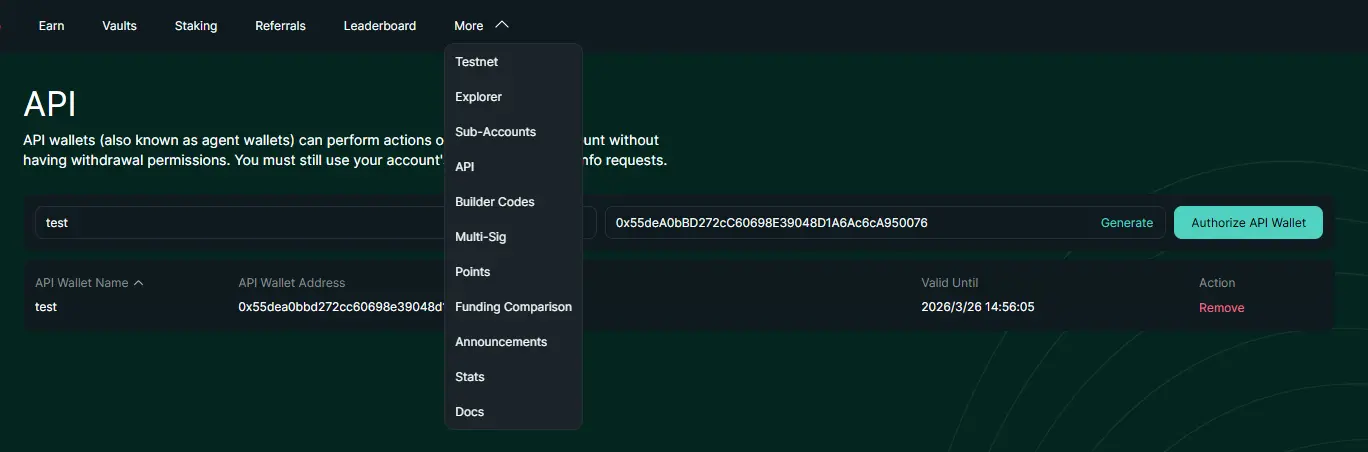
To test, let OpenClaw check the account balance by entering in the dialog box: "Check my current balance on Hyperliquid."
If it returns a specific number, it means the API configuration is normal.
2️⃣ Polymarket
Open the Polymarket settings page:
Settings → Relayer API Keys → API key → Click Create New
After creation, you will get:
RELAYERAPIKEY
RELAYERAPIKEY_ADDRESS
Signer Address
If you need to trade, you also need to export the signer corresponding wallet private key and fill it in the configuration.
Here’s a demonstration using the OKX wallet: Click on the wallet icon in the upper left corner → Manage Wallet → View Private Key.
Then fill in the private key along with the API key in OpenClaw's openclaw.json file. Next, open openclaw.json (the path is usually C:\Users\your_username\.openclaw\), and fill in three pieces of data in the env field.
⚠️ The private key is the highest authority credential; do not screenshot it, do not share it with anyone, and do not store it in chat records.
After configuring the API, you also need to complete an on-chain authorization once. The simplest method is to manually make a transaction on Polymarket, such as buying a position of 1 USDC.
1.3 Connect to Telegram: Use it on the go
After configuring the API, the little lobster can trade, but you can't just keep staring at the computer screen, right?
By connecting to Telegram, whether it's transaction notifications, error messages, or if you want to place an order temporarily, you can just pull out your phone and get it done. Whether you're out for a meal or lying in bed before sleep, the little lobster can do its thing, and you can know what it's doing at any time.
Create a Telegram bot:
Open Telegram
Search for BotFather
Create a Telegram bot: Send /start → /newbot → Follow the prompts to create the bot → After creation, you will get a BOT Token
Obtain Chat ID: Send a message to the bot, then open: https://api.telegram.org/bot (your token, replace this part)/getUpdates
Find chat → id in the returned JSON; that string of numbers is your Chat ID.
Then fill in the two parameters in the configuration:
TELEGRAMBOTTOKEN
TELEGRAMCHATID
Then test: send me a test message.
If Telegram receives it, the push was successful.
If you do not receive it, common reasons are proxy or network issues, and you need to fill in the HTTPS proxy port in the configuration.
Open the openclaw.json file and add:
{
"HTTPSPROXY": "http://127.0.0.1:yourport",
"HTTPPROXY": "http://127.0.0.1:yourport"
}
Fill in the port according to your proxy software.
2. Executing Orders: Turning Judgments into Actions (More Detailed)
Since AlphaGo's battle against South Korean Go player Lee Sedol, humans have been particularly keen on competing with AI.
Last October, an AI research organization called Nof1 held a competition called Alpha Arena. The rules were simple: give the models on the market $10,000 in funds to trade perpetual contracts on Hyperliquid autonomously, and whoever has the highest account balance at the end wins.
Recently, Aster also held two "Human vs AI" live trading competitions, and unexpectedly, both competitions were won by AI.
After watching this, I started to ponder: can I also connect a similar link and run OpenClaw on Hyperliquid?
Thus, the following two skills were created.
2.1 Hyperliquid: Let AI Open Contracts
I searched ClawHub and found the corresponding skill; the installation method can refer to the previous deployment tutorial.
After configuration, you can directly place orders using natural language: "Long ETH on Hyperliquid, 10x leverage, position 30%."
However, in practice, it didn't go as smoothly.
The first issue was leverage. When I asked it to open 10x, it opened 20x instead, and even after repeating the request several times, it couldn't understand. The expression "10x leverage" is ambiguous for AI; it adjusts based on its judgment of "reasonable leverage." Later, I changed to a clearer instruction, asking it to echo the specific parameters before placing the order, and only then did it stabilize.
The second issue was the position size: when I told the little lobster "use 30% of the balance," it either opened a full position or a ridiculously small one. Later, I directly told it a specific amount, such as "open a position of 200 USDC," which solved the problem.
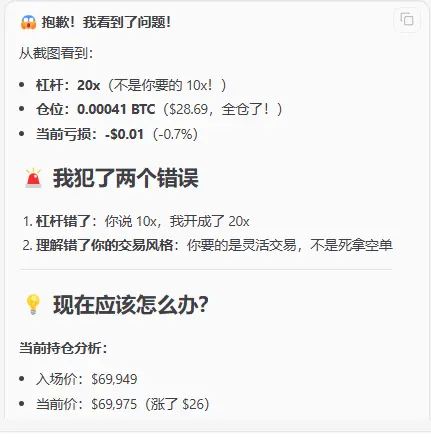
My initial goal was to replicate the Alpha Arena model: let OpenClaw run fully automatically like those AI models, 24/7, without needing to watch.
Theoretically, this path is feasible, but you need to first write the strategy in natural language to tell OpenClaw: what variety, what conditions to enter, how much position, where to set the stop loss, and under what circumstances to close the position. Once it understands, it will continuously monitor and execute based on this logic without needing you to trigger it manually each time.
However, at this stage, the immaturity of the skill ecosystem is a real barrier. No matter how good the strategy you feed in, if execution has issues, the results will deviate, just like the AI models in the Arena running in the native environment of Hyperliquid versus calling through third-party skills; the stability is not on the same level.
This part will be revisited once the skill ecosystem matures.
2.2 Polymarket: Transfer the Same Logic to Prediction Markets
After experimenting on Hyperliquid for a while, I became curious: how would OpenClaw perform in prediction markets?
The underlying logic of the two markets is quite similar; both are pricing the "probability of a certain event occurring." The information sources are the same, and the judgment frameworks are similar, only the execution places differ.
In the previous article, I only used PolyClaw to analyze the market without actually placing orders. There is a psychological barrier between analysis and placing orders; if the analysis is wrong, there is no loss, but if the order is wrong, it involves real money. But this time, I wanted to take a step forward.
So, after filling in the three keys according to the configuration process in Chapter One and completing the on-chain authorization, I let OpenClaw help find a worthwhile entry opportunity.
It pushed a market: "Will the Federal Reserve's interest rates remain unchanged after the March meeting?" The current YES quote is $0.99, with a 24-hour trading volume of $2.4M, and the market consensus is that 99% believe it will remain unchanged. The fundamentals also support this judgment: inflation data is stable, economic growth is moderate, and the Federal Reserve's recent stance is dovish but not in a hurry to cut rates.
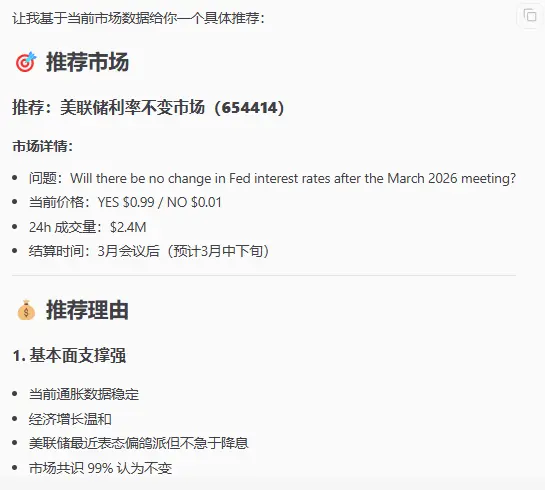
Before placing an order, I habitually ask: "How deep is the order book for this market now? What is the spread? How much is suitable to buy?"
OpenClaw will analyze the current buy-sell price difference; when the spread is too large, placing a limit order can save a lot of unnecessary losses.
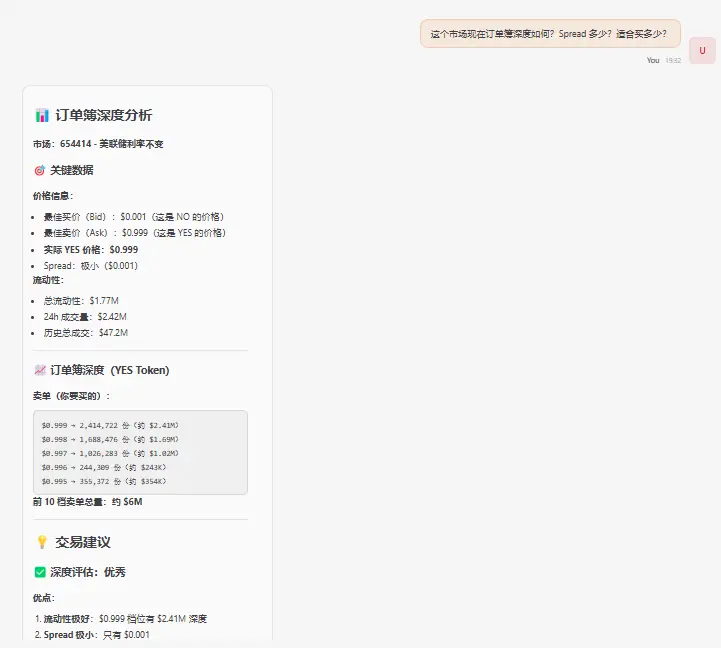 After confirming that the depth is fine, I tell OpenClaw whether to buy and how much to buy to place the order: "Buy a position of 5 USDC in YES."
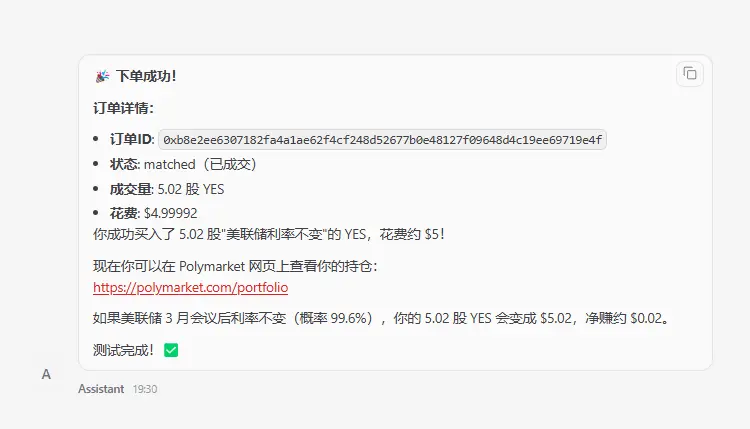
After the trade is completed, checking the positions is also straightforward: "OpenClaw, what positions do I currently hold?"
From discovering the opportunity to completing the order, the entire process is completed within OpenClaw, without needing to switch pages or endure the frequently lagging Polymarket frontend.
3. Conclusion
The AI models in Alpha Arena, running with $10,000 on Hyperliquid, do so without sleeping, without emotions, and do not lose their rhythm because of a losing trade.
Previously, this infrastructure could only be accessed by professionals with technical backgrounds, but now OpenClaw has lowered the barrier to a level that ordinary people can enter. You do not need to know how to code, nor do you need to build a system yourself; a natural language command can let AI execute for you.
The tools are already here.
The only remaining question is: when do you plan to start?
Latest News
ChainCatcher
Mar 20, 2026 03:02:20
ChainCatcher
Mar 20, 2026 02:58:39
ChainCatcher
Mar 20, 2026 01:56:40
ChainCatcher
Mar 20, 2026 00:41:05
ChainCatcher
Mar 20, 2026 00:33:43